A digital detox does not mean quitting your phone. It means changing the defaults so that your devices stop pulling at your attention all day and stop stealing time from sleep. The 7-day plan below works in small steps: one change per day, from notification settings to screen-free evenings. Most people can keep the changes that help and drop the rest.
The short version
- Research links heavy and bedtime screen use with shorter, worse sleep, though the effects vary between people.
- Constant notifications fragment attention. Turning most of them off is the single most effective step.
- Built-in tools like Screen Time (iPhone) and Digital Wellbeing (Android) make limits easy.
- Aim for a screen-free last 30 to 60 minutes before bed and keep the phone out of the bedroom.
What screens do to stress, focus and sleep
The research on screen time in adults is messier than headlines suggest. "Screen time" covers everything from video calls with family to endless scrolling, and most studies show associations rather than proof of cause. Still, a few findings are fairly consistent:
- Sleep: using phones, tablets and computers close to bedtime is linked to falling asleep later and sleeping less. Part of this is light, which can delay the body's release of melatonin, and part is simply that engaging content keeps the brain alert and pushes bedtime back. Sleep medicine groups advise switching off devices before bed.
- Attention: every notification is an interruption. Studies on multitasking show that switching between tasks costs time and mental energy, and getting back into focused work after an interruption takes a while.
- Stress and mood: heavy social media use has been linked to anxiety, poorer mood and comparison with others in some people. The pattern of use seems to matter more than the total hours.
Most adults need at least 7 hours of sleep a night, according to the CDC, and a calmer evening routine is one of the easiest ways to protect it.
Before you start: check your baseline
Open Screen Time (iPhone: Settings, Screen Time) or Digital Wellbeing (Android: Settings, Digital Wellbeing and parental controls). Look at your daily average, how many times you pick up your phone and which apps take the most time. Write down three numbers: total time, pickups and your top app. You will compare them at the end of the week.
The 7-day plan
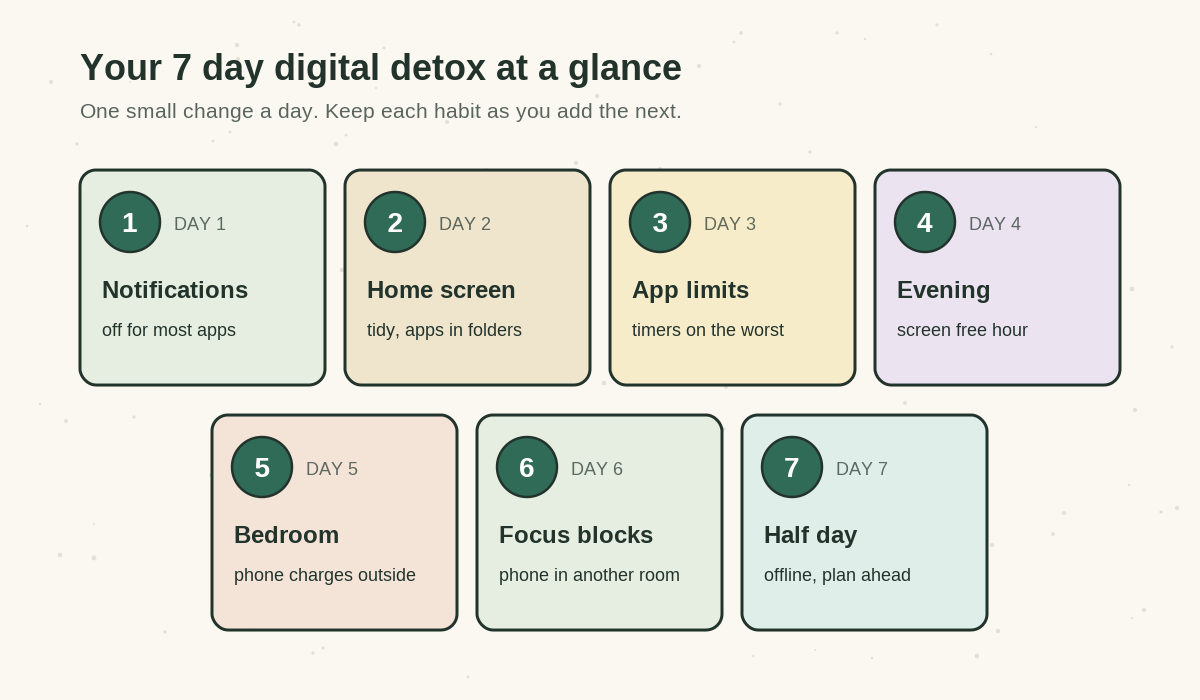
- Day 1: Cut notifications. Go through your notification settings and turn off everything that is not from a real person or truly time-sensitive. Keep calls, messages from close contacts, calendar and banking alerts. Switch off news, shopping, games and social media badges. On iPhone, Scheduled Summary bundles less urgent alerts into one or two deliveries a day.
- Day 2: Clean up your home screen. Move social media, news and video apps off the first screen into a folder, so opening them takes a conscious decision. Put useful tools (maps, camera, notes, calendar) up front. Log out of one app you check compulsively.
- Day 3: Set app limits. Use Screen Time's App Limits or Android's app timers to set a daily cap for your top time-consuming apps, for example 30 minutes. When the limit hits, take it as a cue rather than tapping "ignore" right away.
- Day 4: Create a screen-free evening. Turn on Downtime (iPhone) or Bedtime mode (Android) for the hour before bed. Bedtime mode can turn the screen gray, which makes it far less tempting. Replace the scrolling with something calm: reading on paper, a shower, stretching, talking.
- Day 5: Move the phone out of the bedroom. Charge it in the kitchen or hallway and use a simple alarm clock. If you need the phone nearby for emergencies, put it face down across the room with Do Not Disturb on, allowing calls from favorites.
- Day 6: Protect focus blocks. Set up a Focus mode (iPhone) or Focus mode in Digital Wellbeing (Android) for work. Pick one or two 60 to 90 minute blocks for deep work, with the phone out of sight. Close email and chat in other tabs. Check messages between blocks instead.
- Day 7: Try a half day offline. Pick a morning or afternoon without your phone, or with it switched to calls only. Go for a walk, cook, meet a friend, do something with your hands. Notice how it feels, including any restlessness, which usually fades.
Phone settings that make a difference
- Grayscale: a black and white screen makes colorful apps less tempting. iPhone: Accessibility, Display and Text Size, Color Filters. Android: part of Bedtime mode, or under Accessibility.
- Night Shift or Night Light: warmer colors in the evening. They may help a little, but switching off the screen helps more.
- Do Not Disturb with exceptions: silence everything except selected people, so you do not miss anything important.
- Auto-play off: turn off auto-play for videos in streaming and social apps, which removes the "one more" effect.
- Email fetch: check email manually or every hour instead of push notifications.
Replace, don't just remove
Phones fill gaps: waiting, boredom, a moment of stress. Plan what goes in the gap instead. Keep a book in your bag, take three slow breaths, stretch, or step outside for a few minutes. Short movement breaks like these from our deskercise guide work well during the workday.
After the week
Compare your numbers with the baseline. Most people find that two or three changes do most of the work, usually fewer notifications, a screen-free evening and the phone out of the bedroom. Keep those as defaults. If time crept back up, look at which app and which time of day, and adjust one setting rather than starting over. Some people repeat a phone-free half day every weekend.
Pair it with other evening and morning habits that support energy, such as daylight and movement early in the day. Our morning habits guide has ideas.
When to talk to someone
If you cannot cut back despite real effort, if screen use is harming your work, relationships or sleep, or if you notice symptoms like persistent low mood, anxiety, trouble sleeping most nights for weeks, or thoughts of self-harm, talk to your doctor or a mental health professional. In the US you can call or text 988 for the Suicide and Crisis Lifeline at any time.
Frequently asked questions
Do blue light glasses help with sleep?
Evidence that blue light glasses improve sleep is limited. Reducing screen use before bed and keeping a regular sleep schedule are better supported.
How much screen time is too much for adults?
There is no official limit for adults. A better question is whether screen use crowds out sleep, movement, work focus or time with people. If it does, cut back there first.
Will a digital detox reduce stress?
Many people report feeling calmer, especially after reducing notifications and social media. Studies show mixed results, so treat it as an experiment and see how you feel.
Sources
- Centers for Disease Control and Prevention: About Sleep, how much sleep do I need?
- American Academy of Sleep Medicine: Healthy sleep habits
- National Institutes of Health (NHLBI): Sleep Deprivation and Deficiency
- American Psychological Association: Multitasking, switching costs
- Apple Support: Use Screen Time on your iPhone; Google Help: Digital Wellbeing
Comments
No comments yet. Tried this at home? Tell us how it went.